
Read Meta’s individual creative reports, check their scope and use a practical worksheet to choose your next music-ad test.
If you already run music ads with several images or videos, Meta’s creative breakdown can help you see how individual assets were delivered. Start with one ad and a fixed date range, record what the report includes, then use the result to choose your next question. A delivery report alone does not establish which creative caused better results.
This guide is for independent artists, managers and small labels reviewing an existing campaign. For objectives, destinations and the wider setup, start with the Academy’s guide to running music ads.
Find the asset report and check its scope

Social Media Today highlighted individual creative reporting on 27 October 2026. Meta’s current help page describes the workflow but gives no launch date, so that coverage should not be read as proof of a universal rollout that day.
In Ads Manager, open Breakdown → Creative → Media. Meta’s asset-reporting instructions say this shows results by uploaded asset. The page warns that availability can vary. If the option is missing, record that limitation; rebuilding a working campaign is not a necessary first response.
The scope matters: the Media breakdown covers images and videos delivered as single media. Meta says delivery through the additional collection or carousel display options is excluded from this breakdown. It also documents separate routes for text variations and removed assets. Use those instructions if that is the question you are investigating.
Write the report’s scope at the top of your notes. A partial view should not quietly become a claim about every format in the ad.
Make a small record before editing anything
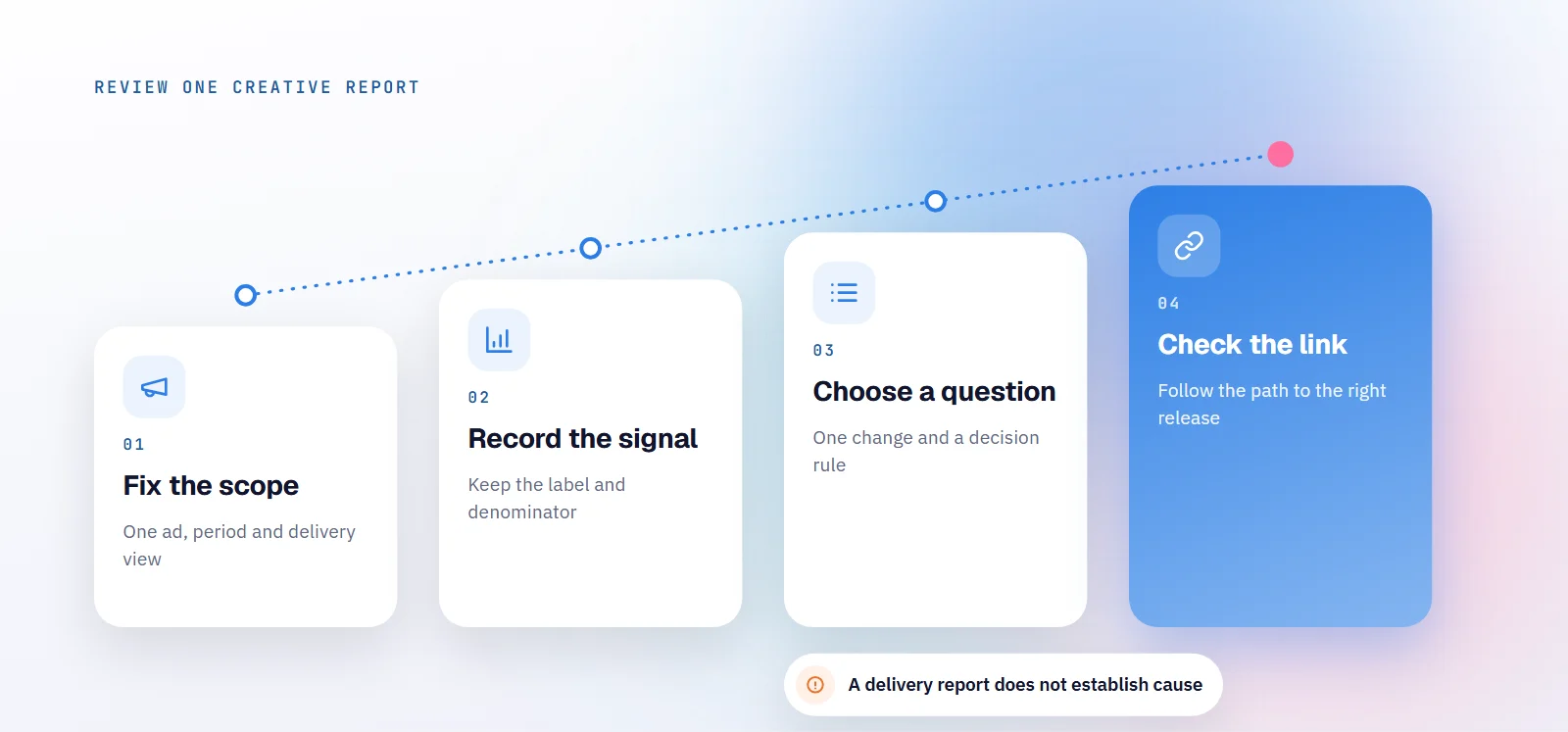
Meta’s multi-media workflow course describes giving its delivery system several creative options within one ad. That makes a stable record useful: you need to know which file, crop and destination a row represents before interpreting it.
Copy this record into the release folder. Use exact filenames so a bandmate can find the version being discussed.
| Record | What to put in it |
|---|---|
| Ad and period | Ad name or ID, start and end dates, account time zone |
| Delivery scope | Selected breakdown and any excluded formats |
| Asset | Filename, opening shot, duration and any placement-specific crop |
| Setup | Objective, destination and attribution setting where relevant |
| Available evidence | Exact column names, values and denominators |
| Next question | One thing to check, the owner and the review date |
Keep unavailable values blank and label them unavailable. A dash is not evidence of zero activity. If a useful metric exists only for the whole ad, keep it at that level; do not distribute the total between assets in proportion to their impressions.
Read the denominator before calling a result
Suppose a fictional report for two clips contains the following values. These numbers illustrate arithmetic, not a real campaign or a promise that every account exposes these columns at asset level. Only make this calculation if matching spend and link-click values are actually available for the same scope and period.
| Asset | Amount spent | Link clicks | Spend divided by link clicks |
|---|---|---|---|
| Wide performance opening | £12 | 30 | £0.40 |
| Close-up opening | £3 | 10 | £0.30 |
The close-up has the lower observed cost per link click in this example. It also has fewer clicks and less spend. Those totals alone do not establish that swapping the opening caused the difference, or that the rate would hold with more delivery. They are enough to suggest a question worth examining.
Keep the definitions beside the numbers:
- Cost per link click in this worksheet: amount spent divided by the matching count of link clicks. With zero clicks it is undefined, not £0.00.
- Link click: the action counted by that ad-report column. It is not necessarily a completed arrival at your page or a music-service choice.
- Impressions: ad displays, which can include repeated displays to the same person. They are not a count of distinct listeners.
- Listening: playback reported by the music service under its own rules. An asset report is not a playback receipt.
Check the exact metric descriptions in your account. Do not substitute all clicks for link clicks, or total button clicks for visits that included a button click, and keep the label unchanged in a report to collaborators.
Turn the finding into one proposed test
Meta’s A/B-testing guidance describes separate audience segments for the versions being compared. It recommends equal budgets for a fair comparison and warns that manually switching campaigns on and off can create unreliable comparisons. Use the formal test workflow when a controlled comparison is the question.
Here is a proposed experiment, not a tested recommendation or a request to increase spend:
- Question: does a close-up in the first three seconds improve the chosen action compared with the existing wide opening?
- Versions: retain the same song excerpt, total duration, copy and destination; change only that opening shot. Keep the remaining setup consistent in the test.
- Baseline: save the current report as context, and include the existing creative as the control version. A before-and-after comparison on its own is not the control.
- Metric: choose one action the account can measure, and name its denominator. For example, spend per recorded landing-page view is different from spend per link click.
- Window and limit: write down the test’s start, end and affordable total cap before it begins. Inspect the platform’s test guidance and expected data volume rather than assuming seven days will prove a result.
- Decision: stop for broken tracking or a broken destination. At the planned end or spending cap, accept an inconclusive result if the evidence cannot distinguish the versions. Do not automatically extend the budget to obtain a winner.
Record interruptions, changed targeting, placement differences and a release announcement during the window. These can complicate interpretation. If there is no suitable budget or measurement setup, the useful action today is to prepare the two clips and the decision record.
Connect the report to the listener’s next step
Open the ad destination on a phone before commissioning another edit. Check the artist, recording, artwork and service buttons. A promising opening cannot repair a link to the wrong release.
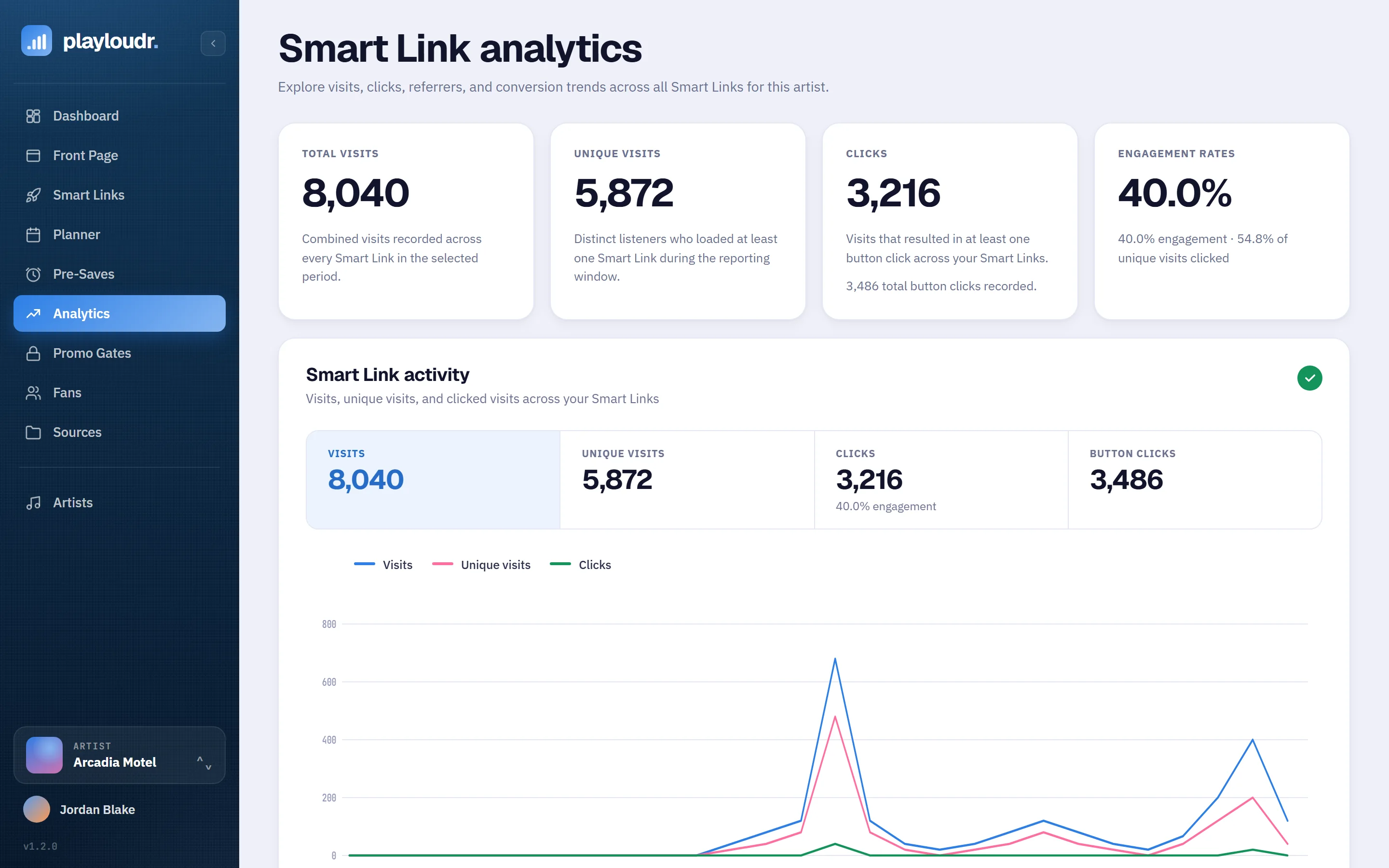
Use Playloudr’s music marketing analytics to inspect what happens on the release page: arrivals and service choices answer a different question from Meta’s creative delivery. The demo above also separates visits with a click from total button clicks. Read the labels before comparing a rate.
Align periods and time zones, and keep each system’s definitions in the report. If both clips use the same destination and the page report cannot distinguish them, you cannot assign its service choices back to the individual creative rows. For the longer explanation, see tracking Spotify clicks from Facebook ads.
Your next step is to save one asset report, test its destination and write one evidence-backed question for the next creative session. Keep the record with your release materials, and use Playloudr to check the listener’s path before deciding on another edit.
Sources checked 28 October 2026. Meta’s help pages are undated and availability may vary. The worksheet, example figures and experiment are editorial tools, not measured campaign results.
Sources and further reading
- Meta: View creative performance for individual media assets in your ad · checked 28 October 2026
- Meta Blueprint: Streamline creative setup with the multi-media workflow · checked 28 October 2026
- Meta: About A/B testing · checked 28 October 2026
- Social Media Today: Meta adds individual performance data for ad creative · checked 28 October 2026